
Logitech C920x vs Insta360 Link 2C Pro: Which Setup Fits Your Computer?
Start with your computer's ports, then check whether you need Link 2C Pro's advanced software path. Logitech documents a direct USB-A setup for C920x but the sources reviewed do not establish its OS or meeting-app support. Insta360 documents its Link 2C Pro controller requirements and the distinction between basic camera video/audio and advanced Virtual Camera features; its two official pages differ on the minimum macOS version for Link Controller.
Published by Pickoryx · Published 2026-09-28 · Updated 2026-09-28
Source checked 2026-09-28 08:17 UTC
Products compared

Product A · ASIN B085TFF7M1
Logitech C920x Pro HD Webcam (960-001335)
Last observed offer
$67.90
Per listed package.
Offer eligibility must be confirmed on Amazon.
Checked 2026-10-19 14:08 UTC. Price and availability may change.
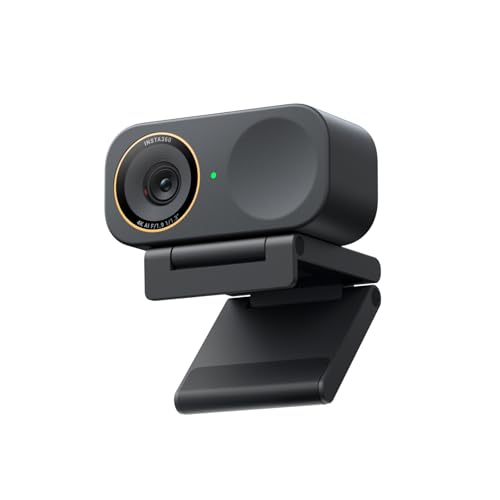
Product B · ASIN B0G3SSQMJQ
Insta360 Link 2C Pro (CINSABPB)
Last observed offer
$199.99
Per listed package.
Offer eligibility must be confirmed on Amazon.
Checked 2026-10-19 19:06 UTC. Price and availability may change.
Pickoryx may earn a commission from qualifying purchases through the paid Amazon links on this page, at no added cost to you.
The buying question
Which documented connection and software path fits the buyer's computer, and what remains unknown for the exact C920x model?
The C920x manual documents an attached USB-A cable and direct USB-A connection; Link 2C Pro documents USB-C or USB-C-to-USB-A connection options and has additional host requirements for its advanced Controller and Virtual Camera features.
Quick verdict
Choose Logitech C920x Pro HD Webcam (960-001335) if
- Your exact C920x is already verified in the operating system and meeting app you use, and its attached USB-A cable fits your computer.
- You do not need Link 2C Pro's Smart Whiteboard, Virtual Background, or other Controller features.
Choose Insta360 Link 2C Pro (CINSABPB) if
- You specifically need Link 2C Pro's advanced Virtual Camera features and your computer meets the relevant OS and hardware requirements.
- Your computer's available connection matches Link 2C Pro's documented USB-C or USB-C-to-USB-A option and can supply the stated power.
When the recommendation changes
- A readable Logitech source for the exact C920x establishes its current operating-system and app support.
- Insta360 resolves the difference between its macOS 10.13 and macOS 11 Link Controller minimums.
- The buyer needs only the basic physical camera stream rather than Link Controller's advanced features.
The differences that matter
Physical Connection And Power Fit
Logitech C920x Pro HD Webcam (960-001335)
The C920x guide shows an attached 1.5 m USB-A cable and instructs users to plug it into a computer's USB-A port.[1]
What this changes: Check the computer's ports and power route before buying. These are documented connection options, not proof that an unlisted adapter or host will work.[1, 2, 4]
Software Host Requirements For Advanced Features
Logitech C920x Pro HD Webcam (960-001335)
The C920x setup guide does not list operating-system or meeting-app requirements; exact-model host compatibility remains unverified in the reviewed sources.[1]
Insta360 Link 2C Pro (CINSABPB)
Link Controller is listed for Windows 10+ but not Windows ARM. Insta360's product page lists macOS 11+ while its FAQ says macOS 10.13+; both say Virtual Camera requires macOS 13+. The setup manual separates basic Physical Camera Stream video/audio from advanced Virtual Camera features.[2, 3, 4]
What this changes: If you need advanced Link 2C Pro features, check the exact host requirements before buying; do not assume those features run on Windows ARM or on a Mac below macOS 13. C920x cannot be presented as a verified replacement because its exact OS/app baseline is unknown.[1, 2, 3, 4]
Best for your routine
You need Link 2C Pro's Smart Whiteboard or virtual background on a supported computer.
Best fit: Insta360 Link 2C Pro (CINSABPB)
Based on listed features, not comparative testing.
Insta360 documents these as Virtual Camera features. Choose Link 2C Pro for this workflow only after confirming your exact OS and hardware meet the relevant requirements; the C920x sources do not establish equivalent feature or host support.
You already use the exact C920x successfully in your required meeting app and need a direct USB-A connection.
Best fit: Logitech C920x Pro HD Webcam (960-001335)
Based on listed features, not comparative testing.
The C920x guide documents the attached USB-A connection. This scenario depends on your confirmed setup; it is not a general compatibility claim for C920x.
Value and trade-offs
One or both observed offers have eligibility conditions, so no unrestricted price difference is shown.
Do not pay extra for advanced Link 2C Pro modes unless you need them and your computer supports their software path.
No price timing recommendation is made; weigh the current price against whether the documented setup fits your needs.
Limitations
- The exact C920x guide supports physical USB-A setup but does not establish current OS, Windows ARM, conferencing-app, or adapter compatibility. Unknown does not mean unsupported.
- Insta360's product specification lists macOS 11+ for Link Controller, while its compatibility FAQ lists macOS 10.13+; confirm with Insta360 if the target Mac runs below macOS 11. Both sources list macOS 13+ for Virtual Camera.
- The Link 2C Pro basic Physical Camera Stream is distinct from its advanced Controller/Virtual Camera path. The sources do not establish basic-stream behavior on a particular Windows ARM host.
- No image-quality, audio-quality, reliability, or measured-performance comparison was conducted. No claim about the C920x's software or feature absence is made.
Questions shoppers ask
Does the C920x work on Windows ARM or with my meeting app?
The Logitech setup guide confirms a USB-A connection but does not specify operating-system or meeting-app support. These sources cannot confirm C920x compatibility with Windows ARM or a particular app; do not treat it as a verified fallback.
Does Link 2C Pro need Link Controller for basic video?
Insta360 separates the basic Physical Camera Stream for video and audio from its Virtual Camera stream for advanced Controller features. The FAQ says the camera can also be used directly with third-party platforms. Check the FAQ for your computer's OS and requirements before relying on advanced modes.
Which macOS version does Link Controller require?
Insta360's product page says macOS 11 or later, while its compatibility FAQ says macOS 10.13 or later. Both say Virtual Camera needs macOS 13 or later. If you use macOS 10.13–10.15, confirm Controller support with Insta360 before buying.
Methodology and sources
Compared only the assigned models' documented connection options and the Link 2C Pro's official operating-system and camera-stream requirements. The C920x setup guide gives no OS/app matrix; unknowns and an official macOS version conflict are stated instead of resolved by inference.
AI tools assisted with researching and drafting this comparison. Neither webcam was hands-on tested.
View 4 sources
- 1.C920X PRO HD WEBCAM Complete Setup GuideLogitech · Official specifications · Source checked 2026-09-28 07:58 UTC
Evidence used on this page
- English pages 3 and 5: Know Your Product / What's in the Box; Connecting the Webcam via USB-A: The guide lists a webcam with a 5 ft (1.5 m) attached USB-A cable and user documentation. It instructs plugging the USB-A connector into a computer's USB-A port. It does not state operating-system or conferencing-app support.
- 2.Insta360 Link 2 Pro & Link 2C Pro - Flagship AI-Powered 4K WebcamInsta360 · Official specifications · Source checked 2026-09-28 08:13 UTC
Evidence used on this page
- Comparison specs table, Link 2C Pro column: Connectivity, Power Consumption, System Requirements, Link Controller: Only the Link 2C Pro column was used. It lists USB-C Cable (USB 2.0) or USB-C-to-USB-A adapter, 5V/1A, Windows 10 or later with ARM-based Windows unsupported, macOS 11.0 or later for Link Controller, and macOS 13.0 or later for Virtual Camera.
- 3.Link Series: CompatibilityInsta360 Link 2C Pro Support · Official support · Source checked 2026-09-28 08:13 UTC
Evidence used on this page
- Applicable Models includes Link 2 Pro and Link 2C Pro; Q3 and Q4, lines 48-70: FAQ explicitly applies to Link 2C Pro. It says Link Controller supports Windows 10+ but not ARM Windows, and macOS 10.13+ with Virtual Camera requiring macOS 13+. It distinguishes Virtual Camera features and limits 50/60 fps. The product page lists macOS 11.0 or later for Link Controller, while the compatibility FAQ lists macOS 10.13 or later; both list macOS 13 or later for Virtual Camera.
- 4.Connecting to ComputerInsta360 Link 2C Pro Support · Official support · Source checked 2026-09-28 08:13 UTC
Evidence used on this page
- Connecting to Computer, steps 1-3 and notes, lines 23-33: Manual says the basic Physical Camera Stream provides video/audio; selecting Insta360 Virtual Camera enables advanced Controller features such as Smart Whiteboard and virtual background. It recommends the included cable, direct computer connection or independently powered dock, and specifies 5V/1A.