
Logitech Z313 vs Z150: Placement and Control Trade-offs
Choose Z150 for a two-speaker layout without a separate subwoofer to place. Choose Z313 if you can accommodate its subwoofer and want a separate wired control pod. Its pod wheel adjusts speakers, not headphone volume.
Published by Pickoryx · Published 2026-10-10
Source checked 2026-10-10 15:21 UTC
Products compared
Product A · ASIN B002HWRZ2K
Logitech Z313
Check Amazon for the current price and availability.
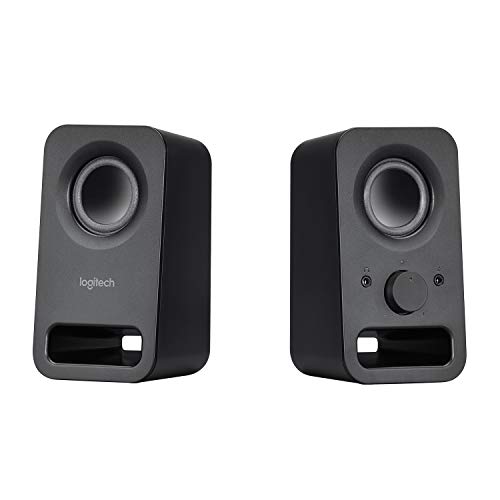
Product B · ASIN B00EZ9XLEY
Logitech Z150 (Black)
Last observed offer
$31.76
Per listed package.
Offer eligibility must be confirmed on Amazon.
Checked 2026-10-19 16:49 UTC. Price and availability may change.
Pickoryx may earn a commission from qualifying purchases through the paid Amazon links on this page, at no added cost to you.
The buying question
Is a separate subwoofer and control pod worth accommodating, or does a two-speaker layout fit better?
A separately positioned control pod and subwoofer versus controls built into the right speaker.
Quick verdict
Choose Logitech Z313 if
- You have space for the subwoofer and want speaker controls beside your hand.
Choose Logitech Z150 (Black) if
- You want fewer speaker enclosures and an accessible right-speaker control panel.
When the recommendation changes
- A tight shelf, blocked right-speaker controls or an awkward cable route prevents the intended layout.
The differences that matter
Speaker Placement And Wiring
Logitech Z313
Two satellites, each 5.76 × 3.52 × 3.19 in (H × W × D), plus an 8.99 × 5.91 × 8.66 in subwoofer.[1]
Logitech Z150 (Black)
Two speakers, each 5.96 × 3.33 × 2.99 in (H × W × D), with an external power supply.[2]
What this changes: Choose Z150 when there is no sensible place for a separate subwoofer. Z313 still needs two desktop positions plus space for its pod; measure the subwoofer location and cable route before choosing it. These body dimensions exclude cable-bend and access space.[1, 2]
Speaker Placement And Wiring
Logitech Z313
Satellites connect to the subwoofer; plug the power cord into an outlet and the control-pod audio lead into the source.[3]
What this changes: Plan Z313 around the subwoofer connection hub. With Z150, plan around the right speaker and allow routing slack; the cable length is not a promise of usable straight-line separation.[3, 4, 5]
Control And Private Listening Workflow
Logitech Z313
Power, speaker-volume wheel and headphone jack are on a separate wired pod. Headphone volume must be adjusted at the audio source; the pod wheel does not control it.[3]
Logitech Z150 (Black)
Power/volume knob, headphone jack and auxiliary jack are on the right speaker. The guide also documents a front auxiliary source connection.[4]
What this changes: Z313 suits a layout where controls should stay near your hand while speakers sit farther away, within cable reach. Z150 keeps the controls on one speaker, so leave its front accessible. Both offer a headphone route; do not choose Z313 expecting its wheel to adjust headphones.[3, 4]
Best for your routine
Desk with no practical subwoofer location
Best fit: Logitech Z150 (Black)
Based on listed features, not comparative testing.
Z150 keeps the speaker arrangement to two enclosures; allow space for the adapter and cable runs.
Speaker positions are beyond comfortable arm’s reach
Best fit: Logitech Z313
Based on listed features, not comparative testing.
Z313 lets the wired pod occupy a separate reachable position, provided its cable reaches. The extra subwoofer still needs a home.
Value and trade-offs
One or both observed offers have eligibility conditions, so no unrestricted price difference is shown.
Pay for a layout you can use, rather than assuming a larger system guarantees better sound.
Insufficient verified price history to recommend buying now or waiting.
Limitations
- This compares black US Z313 part 980-000382 and Z150 part 980-000802. No hands-on sound, loudness or reliability comparison was performed.
- Dimensions above follow the current exact-part US product pages. Logitech’s Z150 support table gives different width/depth figures; confirm the physical unit before a tight shelf fit.
- Z313 cable reach and Z150 headphone-volume control behavior are not established here. Do not infer either from the general controls description.
Questions shoppers ask
Will the Z313 pod set headphone volume?
No. Logitech instructs you to set headphone volume at the audio source. Keep that control accessible when planning private listening.
What should I measure before ordering?
Check enclosure space, reachable controls, the outlet and the complete cable path around the desk. Leave room for plugs and slack rather than measuring only a straight line.
Methodology and sources
Compared enclosure placement, documented wiring routes and control access.
AI assisted research and organization of the purchasing trade-offs.
View 5 sources
- 1.Z313 US product specificationsLogitech · Official specifications · Source checked 2026-10-10 15:21 UTC
Evidence used on this page
- Specs and Compatibility; current HTML productDimensions and representedProductId: US black part 980-000382. Satellite H/W/D 146.2/89.4/81 mm; subwoofer 228.4/150/220 mm. Wired control pod.
- 2.Z150 US product specificationsLogitech · Official specifications · Source checked 2026-10-10 15:21 UTC
Evidence used on this page
- Specs and Compatibility; current HTML productDimensions and representedProductId: US black part 980-000802. H/W/D 151.5/84.5/76 mm. Two speakers and power supply; controls and headphone jack on right speaker.
- 3.Z313 complete setup guideLogitech · Official specifications · Source checked 2026-10-10 15:21 UTC
Evidence used on this page
- English pages 3–5, product diagram, connection steps and headphone note: Satellites connect to subwoofer; power goes to outlet; pod audio lead connects to device. Pod wheel controls speaker volume, not headphone volume.
- 4.Z150 complete setup guideLogitech · Official specifications · Source checked 2026-10-10 15:21 UTC
Evidence used on this page
- English pages 3–5, wiring and controls: Adapter connects to rear of right speaker; attached 3.5 mm lead or front auxiliary input accepts source. Front headphone jack; right speaker power/volume knob.
- 5.Z150 technical specifications and cable lengthsLogitech · Official specifications · Source checked 2026-10-10 15:21 UTC
Evidence used on this page
- Speaker Specifications and Product Dimensions, lines 54–81: 2.0 arrangement; source and power cables each 1.8 m, interspeaker cable 1.2 m. Support dimensions conflict with current US product-page dimensions; use current exact-part page for body dimensions and preserve tight-fit caution.